
Sign documents. Stay in control.
Electronic signatures for Singapore finance, insurance, and professional services teams. Send, track, and complete documents with audit trails.
Or run it from your AI: connect SignAndGo to ChatGPT or Claude and ask it to send documents, chase signers, and file signed PDFs. See how it works →
Prices start at S$29 a month. What’s stored where →
Signing in order: the tenant has signed and the landlord is next. Remind or resend in one click. Click where each person signs, initials and dates. Each person has their own colour. No account needed. One button takes them to each field in turn. Enter the verification ID from the signed PDF to see who signed, and that it has not changed since.
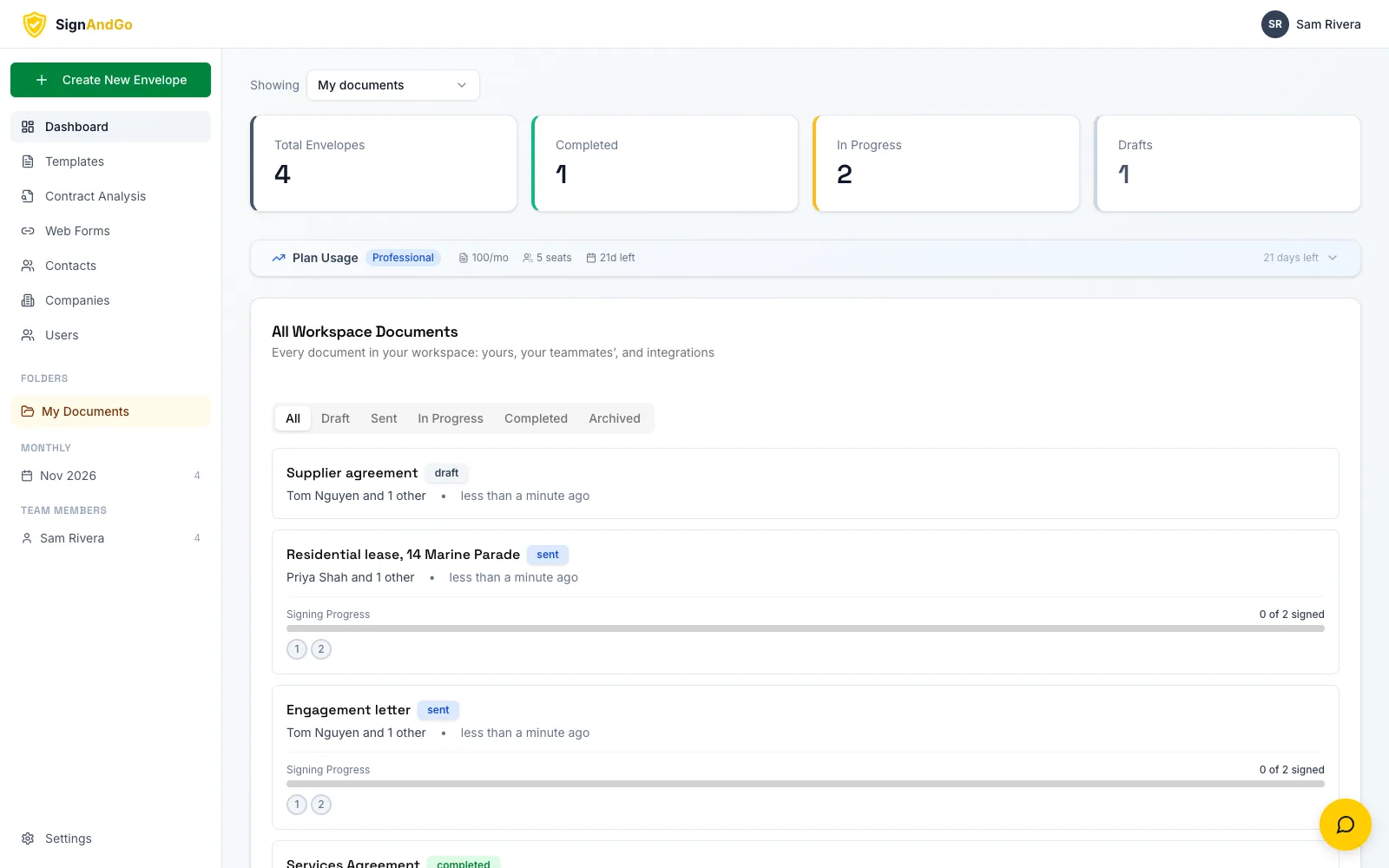
Real SignAndGo screens from a demo workspace. The businesses, people and documents are invented.
Bring your own AI.
Ask Claude or ChatGPT about your envelopes. Get instant status across your workspace, surface stalled signers, draft sends from existing templates, void or remind in a single message, all without leaving the chat.
Native Model Context Protocol (MCP) support. Your AI sees only the envelopes you allow, with separate consent gates for read and write.
File uploads and bulk write operations work best from Claude Desktop, ChatGPT Desktop, or custom MCP clients. Supported environments →
Built for teams who need more than a signature
Scattered approvals slow you down
Create structured signing workflows with sequential or parallel routing. Track every envelope from one dashboard.
Audit gaps create compliance risk
Every action is logged. Download verifiable audit certificates for each completed document.
Shared logins and weak access controls
Assign roles and permissions per user. Separate teams with workspace and subgroup isolation.
More than just signatures
Built-in integrations that save time and reduce errors, with no extra apps or subscriptions needed.
UEN and GST details on every document
Every Singapore entity has a Unique Entity Number, and GST-registered businesses show their GST registration number on tax invoices, currently at 9% GST. Save these in a template, or type them straight onto the document before you send, so each agreement goes out with the right identifiers.
AI Field Placement
Upload a document and SignAndGo suggests where the signature, date and initial fields belong. It runs inside SignAndGo, so your document is not sent to an outside AI service.
Document Verification
Every signed document carries a verification ID. Anyone holding a copy can check it online to confirm it came from SignAndGo.
Audit Certificate
A certificate is added to every completed document, recording who signed, when, and each step along the way.
Email Verification
We verify recipient email addresses before you send, catching typos and invalid domains early.
Location Verification
The signer’s location is looked up from their IP address and recorded on the audit trail.
Meet Sharna
Your assistant, any time. Ask in the chat and she gets your question to our team.
From upload to signed in four steps
Upload or create
Upload your PDF or Word document, or start from a saved template.
Add recipients and fields
Drag signature, date, and text fields onto the document. Assign each field to a recipient.
Send via email
Recipients receive a secure signing link.
Track and download
Monitor progress in real time. Download the signed document and audit certificate when complete.
What Singapore teams send for signature
Most documents that cross a Singapore desk for signature fall into a few types, and each one uses a feature already in SignAndGo.
- Employment contracts and Key Employment Terms. Send the offer and the written terms together, and keep the signed copy with its audit certificate.
- Tenancy agreements and letters of intent. Set the signing order so each party signs in turn, and everyone receives the completed copy.
- Service agreements, NDAs and supplier contracts, sent from a saved template.
- Engagement letters for accounting, corporate secretarial and advisory firms, with an AI review over the terms before they go out.
- Client forms and declarations for insurance and financial advisory teams, with a supporting document requested in the same envelope.
- Staff policies and notices. Use Send to view to get a receipt when each person has read it.
Everything you need to manage document signing
Edit directly on the document
Double-click any text field to type directly on the PDF. Pre-fill names, dates, and amounts before sending. Your recipients just sign.
Sharna: your assistant
Ask Sharna anything, any time, from the chat on any page. She takes your question to our team, and we reply by email.
Your own templates
Save frequently used documents as templates. Add recipients and fields once, then reuse for every new signing request.
Automatic reminders
Set reminder schedules per envelope. Recipients receive follow-up emails until they sign.
Complete audit trail
Every signature event is recorded with who, when and from where, and each signed document has its own public verification page.
Access controls
Assign admin, sender, or viewer roles. Control who can create, send, and manage documents across your team.
Workspace separation
Isolate data by workspace. Subgroups let you control access within a workspace for different teams.
Developer API
Full REST API with Bearer token authentication, real-time webhooks, and scoped API keys with granular permissions.
Folders and filters
Organise envelopes by status, date, or custom folders. Find any document in seconds.
Document Verification
Every signed document gets a unique verification ID. Anyone can verify authenticity at sign.myandgo.sg/verify. No uploads needed, just the ID.
AI Document Summary
Signers can request a plain-language AI summary before signing. Highlights key obligations, rights, and potential concerns. A reading aid, not legal advice.
Drag & Drop Everything
Drag files to upload, drag to reorder documents in bundles, drag recipients to set signing order, and drag fields with snap-to-grid precision.
Witnessed signatures
Add a witness to any signature. They receive their own secure link once the signer has signed, and how they verified identity is recorded in the audit trail.
Approvals and countersigning
Require an internal approval before anyone is asked to sign, or place the approver last so a manager countersigns to complete. Approvers review without placing a signature.
Send to view
Not everything needs a signature. Send a notice or policy for review, get told the moment it is opened, and receive a receipt when it is acknowledged.
In-person signing
Sign on the spot at a counter, on site, or across a desk. Hand over your own device and capture the signature there, with the same audit trail as a remote signature.
Ask signers for documents
Place an upload field and require a licence, certificate, or proof of insurance alongside the signature. Every file is virus-scanned before anyone can open it.
Web forms
Publish a link that anyone can fill in and sign, with no envelope to send first. Ideal for onboarding, consent, and intake that arrives on its own schedule.
Contract analysis
Run an AI review over a contract before it goes out. Surfaces obligations, dates, and unusual terms so nothing is signed unread. A reading aid, not legal advice.
Fits the tools you already run
Signed documents should land where the work already happens, not in another inbox to be filed by hand.
Claude and ChatGPT
Ask your own AI assistant about your envelopes, then send, remind, or void without leaving the conversation.
See how it works →Your own systems
A REST API with scoped keys and signed webhooks, so your CRM or portal can raise a signing request and hear back when it completes.
Read the docs →Sign in with Google or Microsoft, and bring your team with you. See all integrations
Security built in, not bolted on
SignAndGo is designed with security at the core. Key controls include:
- Secure signing links: Opaque, high-entropy tokens with expiry and single-use enforcement
- Full audit trail: a record of every signing event
- Workspace isolation: Data access scoped to each workspace, with subgroup controls
- Rate limiting & fraud detection: Abuse protections on authentication and signing endpoints
Infrastructure & Compliance
Built on Google Cloud infrastructure (Singapore region), which holds ISO 27001, 27017, and 27018 certification. SignAndGo's own security practices are aligned to SOC 2 (SignAndGo is not yet independently SOC 2 certified), with AES-256 encryption at rest and in transit and two-factor authentication available on all accounts.
Electronic signatures and Singapore law
Singapore recognises electronic signatures under the Electronic Transactions Act 2010. In general terms, where a rule of law requires a signature, an electronic signature can satisfy it if it identifies the person and shows their intention in respect of the document, using a method that is as reliable as appropriate for the purpose. The Act also describes secure electronic signatures, which carry additional legal presumptions. SignAndGo provides electronic signatures under the Act. It doesn't provide secure electronic signatures, such as signing with Singpass.
Some documents are excluded from the Act's general rules or carry their own formalities, such as wills, powers of attorney and certain property documents. If a counterparty or agency asks for a particular signing method, such as Sign with Singpass, confirm their requirement before you send. This is general information, not legal advice.
Stored in Singapore
Your documents are stored in Google Cloud Storage in Singapore (asia-southeast1). Each workspace is kept separate from other customers, and inside your team, access follows the roles you assign.
The Personal Data Protection Act 2012 sets obligations for organisations that collect, use and disclose personal data, including protecting it and controlling transfers overseas. When a client asks where their signed documents are kept, you can give them a straight answer, and the Data Residency page sets it out in full.
Integrate eSignatures into your workflow
- Full REST API with Bearer token authentication
- Real-time webhooks for envelope status changes
- Python, JavaScript, and cURL code examples
- Scoped API keys with granular permissions
import requests

API_KEY = "sag_..."
BASE = "https://sign.myandgo.sg/api/v1"

# Create and send an envelope
envelope = requests.post(
    f"{BASE}/envelopes",
    headers={"Authorization": f"Bearer {API_KEY}"},
    json={
        "title": "Service Agreement",
        "document_id": "doc_abc123",
        "recipients": [{
            "name": "Jane Smith",
            "email": "jane@example.com",
            "role": "signer"
        }]
    }
)

print(f"Envelope: {envelope.json()['id']}")
Simple, transparent pricing
Choose the plan that fits your team. All plans include secure signing links, audit trails, and workspace isolation. Prices are in Singapore dollars.
Personal
Try SignAndGo free. No credit card required
Free
Starter
Individuals and small teams getting started
S$29/mo
Professional
Growing teams with multiple senders
S$59/mo
Business
Organisations with compliance needs
S$99/mo
Enterprise
Custom deployments and SLAs
Contact us
Choosing an e-signature provider in Singapore
Singapore teams often weigh SignAndGo against global platforms such as DocuSign, Adobe Acrobat Sign and Dropbox Sign. Whichever you choose, five questions separate the options quickly.
- What does it cost in Singapore dollars? SignAndGo starts at S$29 a month, and the Personal plan is free.
- Where are documents stored? Ours are stored in Singapore.
- Do signers need an account? With SignAndGo, they sign from a secure link with no account.
- Can anyone check a signed document later? Every SignAndGo document carries a verification ID that anyone can check at sign.myandgo.sg/verify.
- Does it work with your AI assistant? SignAndGo connects to Claude and ChatGPT, with consent set per envelope.
Frequently asked questions
Are electronic signatures legally binding in Singapore?
Can we send Key Employment Terms for signature?
Are prices in Singapore dollars?
Is SignAndGo free?
Do signers need to create an account?
How do you secure signing links?
Do you store documents, and for how long?
How do workspaces and subgroups isolate data?
Can we export our data?
What support is included?
Do you offer annual billing?
Can we use our own domain for signing links?
What happens if a recipient doesn't sign?
How do I verify the integrity of an audit trail?
Ready to streamline your document signing?
Every new account starts with a free 14-day Professional trial, with no card needed. When it ends, you keep the free Personal plan (3 envelopes a month) for as long as you like, or choose a paid plan. The free Personal plan is for one person.